Dell S2725QS 27 Inch 4K Monitor Review: Worth It? (October 2026)
The Dell S2725QS is a 27-inch 4K monitor with an IPS panel, up to 120Hz refresh rate and an adjustable stand. It suits a desk where sharp detail and flexible positioning matter, with HDMI and DisplayPort connections.
On this page (8 sections)
- The Dell S2725QS at a glance
- What does the S2725QS offer for work and media?
- Is 27 inches the right size for 4K?
- How do the S2725QS connections affect setup?
- Is the stand flexible enough for your desk?
- What are the S2725QS's main trade-offs?
- How we compared these Dell monitors
- Should you choose the Dell S2725QS?
The Dell S2725QS is a 27-inch 4K IPS monitor with a refresh rate up to 120Hz and an adjustable stand. It fits a desk where you want detailed images and flexible screen positioning, with HDMI and DisplayPort connections.
Your computer's connections should guide the choice. If you want one cable to carry video and charge a compatible laptop, compare the Dell S2725QC; if you want a larger screen, look at the 32-inch S3225QS.
The Dell S2725QS at a glance
The S2725QS combines 3840 x 2160 resolution with an IPS panel, up to 120Hz refresh rate and a stand that adjusts for height, pivot, swivel and tilt. It also includes built-in speakers and HDMI and DisplayPort connections.
Dell S2725QS
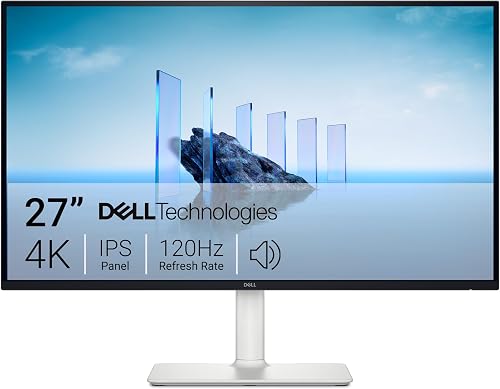
- 27-inch 4K UHD IPS panel
- Up to 120Hz refresh rate
- 99% sRGB
- Height, pivot, swivel and tilt adjustment
- HDMI and DisplayPort
A 27-inch 4K IPS monitor with a stand that adjusts for height, pivot, swivel and tilt. Choose it for a detailed desk display with HDMI or DisplayPort.
Pros
- 4K resolution on a 27-inch IPS panel
- Up to 120Hz refresh rate with FreeSync Premium
- Stand adjusts in four ways
- Built-in speakers
Cons
- Laptop users seeking USB-C power delivery should compare the S2725QC
- Its 4K resolution may call for display scaling on a 27-inch screen
Its 27-inch screen keeps the monitor in the familiar size range for a home office, while 4K gives you more pixels than a QHD display at the same size. You may need display scaling to make menus and text comfortable to read.
Who should consider the Dell S2725QS?
Consider it if you want a 27-inch 4K display with an adjustable stand and plan to connect through HDMI or DisplayPort. The combination of IPS, 99% sRGB and a refresh rate up to 120Hz covers a mix of office tasks, media and casual gaming.
Compare other models if your desk setup depends on USB-C power delivery or if you prefer a larger screen. The S2725QC offers USB-C, while the S3225QS moves up to 32 inches.
What does the S2725QS offer for work and media?
The S2725QS has 3840 x 2160 resolution, an IPS panel and 99% sRGB color coverage. Those specifications make it a candidate for detailed documents, browsing, photo viewing and video on a 27-inch screen.
A 4K display can show more image detail than a lower-resolution monitor of the same size. But the extra pixels can make interface elements look smaller, so check the display scaling controls on the computer you'll use.
The monitor has a 1500:1 contrast ratio, and Dell describes it as HDR-ready. That description alone doesn't establish how an HDR image will look in your room, so don't base the choice on HDR support alone.
The monitor also has AMD FreeSync Premium and a refresh rate up to 120Hz. That can make compatible motion look smoother than a 60Hz display, though the computer and connection need to support your chosen resolution and refresh rate.
Is 27 inches the right size for 4K?
A 27-inch 4K screen suits you if you want high pixel detail without moving to a larger screen. The benefit is fine text and image detail; the thing to plan for is how small interface elements can appear before scaling.
Your viewing distance and preferred text size affect how comfortable the screen feels. Before choosing a monitor, compare the S2725QS with our guide to how far to sit from a 27-inch monitor and our explanation of whether a 4K monitor is worth it for office work.
Think about the work you do each day. A spreadsheet with many columns or a high-resolution photo may benefit from 4K detail, while basic documents and web browsing may not need it.
The 27-inch and 4K monitor guide covers how screen size and resolution affect a desk setup. If you're comparing screen sizes, our guide to 27-inch versus 24-inch monitors can help you decide how much desk space you want to use.
How do the S2725QS connections affect setup?
The S2725QS connects through HDMI or DisplayPort, so check which output your computer supports before you buy. For a laptop setup that needs USB-C video and power delivery, compare the S2725QC.
That matters most if you often connect and disconnect a laptop. The S2725QC has USB-C with up to 65W power delivery, which may reduce cable clutter for a compatible laptop setup.
Check your computer's specifications to confirm it can send video at the resolution and refresh rate you want. If you use a dock, confirm that the dock's video output supports your intended display settings too.
Is the stand flexible enough for your desk?
The S2725QS stand supports height, pivot, swivel and tilt adjustments. That gives you several ways to position the screen for your chair, desk and preferred viewing angle.
Height adjustment lets you raise or lower the screen. Tilt and swivel let you change the angle, while pivot supports portrait orientation for tasks such as reading long pages.
Measure the available desk depth and check nearby shelves, walls and equipment before choosing a position. A rotating screen needs room to turn, and the stand's footprint has to fit alongside your keyboard and other desk items.
What are the S2725QS's main trade-offs?
The S2725QS pairs a 4K IPS display with up to 120Hz and four-way stand adjustment, but other models fit different priorities. Compare the S2725DSM for 144Hz QHD, the S2725QC for USB-C power delivery or the S3225QS for a larger screen.
If you value a higher refresh rate over 4K resolution, the S2725DSM is a 27-inch QHD monitor with a 144Hz refresh rate and 1ms MPRT. It keeps the screen size similar while changing the resolution and refresh rate.
The S2725QS's 27-inch size may feel small if you prefer a larger viewing area. The Dell S3225QS offers a 32-inch 4K VA panel, but its 28.05-inch width needs more desk space than the S2725QS's 24.08-inch width.
How we compared these Dell monitors
The Dell S2725QS scores highest here for its 27-inch 4K IPS display, up to 120Hz refresh rate and four-way stand adjustment. Our score weighs specs and features against what you're shopping for.
We compared resolution, panel type, refresh rate, connections, screen size and stand adjustments. The S2725DSM follows at 8.8, then the S2725QC at 8.4 and the S3225QS at 8.2.
Those alternatives address different needs: 144Hz at QHD resolution, USB-C laptop connections and a larger 32-inch screen. Their scores don't replace checking which features your own desk setup needs.
For the S2725QS, start with your computer's video outputs and the space available on your desk. See Dell's S2725QS support page for model information.
Should you choose the Dell S2725QS?
Choose the Dell S2725QS if you want 27-inch 4K, an IPS panel and an adjustable stand, and HDMI or DisplayPort works for your computer. Compare the S2725QC if USB-C power delivery matters, or the S3225QS if you want a larger screen.
For more help comparing screen types, read our guide to Dell monitor models and series. Match the monitor to your computer's connections, available desk space and preferred resolution before you decide.
Is the Dell S2725QS a good office monitor?
It can suit an office desk if you want 27-inch 4K resolution and an IPS panel. Its stand supports height, pivot, swivel and tilt adjustment, so you can change the screen's position.
Its HDMI and DisplayPort connections suit computers with those outputs. If your office setup relies on USB-C laptop charging, compare the S2725QC first.
Does the Dell S2725QS include speakers?
Yes, the Dell S2725QS has built-in speakers, which can be convenient if you want basic audio without separate desk speakers. That makes them a useful feature to consider for a simple work or media setup.
If audio connections or speaker output are central to your choice, confirm those requirements before ordering.
What is the difference between the Dell S2725QS and S2725QC?
Both are 27-inch 4K IPS monitors with a refresh rate up to 120Hz and 99% sRGB. The S2725QC offers USB-C with up to 65W power delivery, while the S2725QS has HDMI and DisplayPort connections.
Choose based on how you connect your computer and whether laptop charging through the monitor matters.
Frequently asked questions
Is the Dell S2725QS a 4K monitor?
Yes, the Dell S2725QS has a native resolution of 3840 x 2160, commonly called 4K UHD, on a 27-inch IPS panel. That provides fine image detail for text, photos and video, though you may want to adjust your computer's display scaling to make menus and text easier to read.
Does the Dell S2725QS have USB-C?
The S2725QS has HDMI and DisplayPort connections; for USB-C video and laptop charging, compare the Dell S2725QC. The S2725QC supports up to 65W power delivery through USB-C, so check that your laptop supports video over that connection and that 65W meets its charging needs.
Can you adjust the Dell S2725QS stand?
Yes, the S2725QS supports height, pivot, swivel and tilt adjustment, giving you several ways to position the screen for your desk and seating. Check that your preferred position works with your desk depth and nearby objects, especially if you plan to rotate the monitor into portrait orientation.
Is the Dell S2725QS good for gaming?
The Dell S2725QS offers up to 120Hz and AMD FreeSync Premium, making it worth considering for gaming alongside office work. Check that your computer supports your chosen resolution and refresh rate, and compare the 144Hz QHD Dell S2725DSM if a higher refresh rate matters more than 4K detail.